When venue owners compare different venue management software solutions, they often focus on features like booking management, CRM, billing, reports, payment tracking, and automation. While these capabilities are essential, one factor is frequently overlooked—UI/UX (User Interface and User Experience).
A powerful software platform isn’t just about having dozens of features. If your team struggles to navigate the system, spends extra time finding information, or makes frequent mistakes because of a confusing interface, even the most feature-rich solution can become frustrating. Read more here about – The Future of Venue Management: AI, Automation, and Cloud Technology.
A modern, intuitive UI/UX helps venue owners, managers, and staff complete tasks faster, reduces training time, improves customer service, and boosts overall productivity. In today’s competitive event industry, software that is easy to use can make a significant difference in daily operations.
What Is UI/UX in Venue Management Software?
UI (User Interface) refers to how the software looks—its buttons, menus, dashboards, colors, and layouts.
UX (User Experience) focuses on how users interact with the software. It determines whether completing a task feels simple, intuitive, and efficient.
A Good UI Includes:
Clean dashboard
Easy-to-read reports
Clear navigation
Mobile-friendly layouts
Fast loading screens
A Good UX Includes:
Fewer clicks to complete tasks
Logical workflow
Easy staff onboarding
Minimal learning curve
Faster task completion
Together, UI and UX directly impact how efficiently your venue operates every day.
Why UI/UX Matters More Than You Think
Many venue businesses invest in software expecting it to solve operational challenges. However, if employees avoid using the platform because it feels complicated, the software quickly loses its value.
Faster Daily Operations
Venue managers handle dozens of tasks every day, including:
Managing enquiries
Confirming bookings
Checking payment status
Assigning staff
Sending follow-ups
Viewing event schedules
With a well-designed interface, these tasks take minutes instead of hours.
Less Time Searching for Information
Instead of navigating multiple menus, users can quickly access booking details, customer information, invoices, and reports from a centralized dashboard.
Reduced Staff Training Time
One of the biggest hidden costs of complicated software is employee training.
New staff members often require days—or even weeks—to become comfortable with outdated systems.
Modern venue management software with intuitive navigation allows new employees to learn quickly without extensive training.
Benefits Include
Faster onboarding
Higher staff confidence
Reduced support requests
Better operational consistency
Fewer Human Errors
Complicated workflows often lead to mistakes such as:
Double bookings
Incorrect invoices
Missed follow-ups
Wrong payment entries
Scheduling conflicts
A user-friendly interface minimizes these risks by making important information easy to locate and reducing unnecessary manual steps.
Better Customer Experience
Although customers may never directly interact with your management software, they experience its impact.
When your team can instantly access booking details, payment history, event schedules, and customer preferences, they can provide faster and more professional service.
This results in:
Faster enquiry responses
Improved communication
Better event coordination
Higher customer satisfaction
Increased repeat bookings
Mobile-Friendly Design Is No Longer Optional
Today’s venue owners rarely work from a single office.
They manage operations while:
Meeting clients
Supervising events
Visiting multiple venues
Traveling
Modern venue management software should provide a seamless experience across:
Android
Manage bookings and enquiries on the go.
iPhone (iOS)
Access event schedules and customer details anytime.
Desktop
Handle detailed reporting, billing, and administration.
Tablets
Monitor operations during live events with ease.
Cross-platform accessibility ensures your business stays connected wherever you are.
How Modern UI Improves Team Productivity
An intuitive interface helps every department perform more efficiently.
Sales Team
Respond to enquiries quickly
Track lead status
Schedule follow-ups
Operations Team
Manage bookings
Allocate resources
Coordinate events
Finance Team
Track payments
Generate invoices
Review financial reports
Management
Access dashboards
Monitor business performance
Make informed decisions
When every team member works from the same easy-to-use platform, collaboration becomes smoother and more effective.
Features That Define Excellent Venue Management Software UI
H3: Simple Dashboard
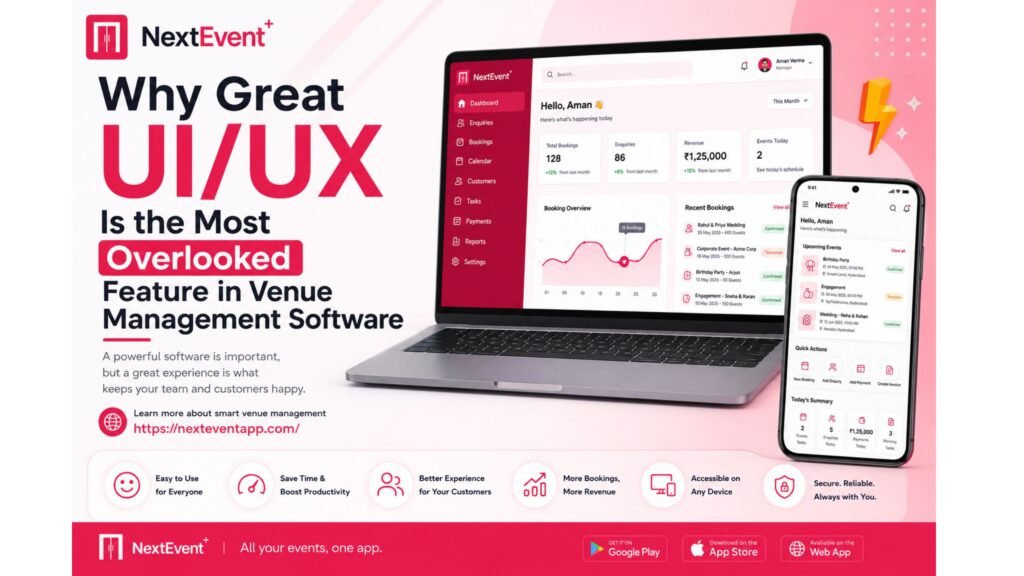
The dashboard should display bookings, enquiries, revenue, pending payments, and upcoming events in one place.
H3: Quick Navigation
Users should reach any feature within a few clicks.
H3: Smart Search
Finding a customer or booking should take seconds.
H3: Responsive Design
The interface should adapt seamlessly to desktops, tablets, and smartphones.
H3: Consistent Layout
Menus, buttons, and workflows should remain consistent throughout the application.
Choosing Software Beyond Features
When comparing software solutions, many businesses create feature checklists.
However, if two platforms offer similar capabilities, usability becomes the deciding factor.
Ask yourself:
Can my staff learn it quickly?
Can I access it from any device?
Will it reduce daily workload?
Can new employees start using it without lengthy training?
Will it help us respond to customers faster?
The answers to these questions often determine whether software becomes an asset or a burden.
Why NextEvent Focuses on User Experience
At NextEvent, we believe software should simplify venue management—not complicate it.
That’s why our platform is designed with a modern, intuitive interface that helps venue owners and teams manage bookings, enquiries, payments, staff, and daily operations with ease. Whether you’re working on Android, iOS, or desktop, the experience remains fast, consistent, and user-friendly.
Combined with automation, unlimited staff access, unlimited device access, regular updates, enterprise-grade security, and upcoming AI-powered capabilities, NextEvent is built to support the evolving needs of modern venue businesses.
Conclusion
Features are important, but they’re only valuable if your team can use them efficiently. A thoughtfully designed UI/UX reduces training time, minimizes errors, improves productivity, and enhances the customer experience.
When selecting venue management software, don’t just compare feature lists. Evaluate how the software feels to use every day. A platform with a clean, intuitive design can help your business operate more smoothly, save valuable time, and support long-term growth.
Frequently Asked Questions (FAQs)
1. What is UI/UX in venue management software?
UI refers to the visual design of the software, while UX focuses on how easy and efficient it is to use. Together, they improve productivity and reduce operational errors.
2. Why is a modern UI important for venue businesses?
A modern interface helps staff complete tasks faster, reduces training time, minimizes mistakes, and improves overall efficiency.
3. Can good UI/UX improve customer satisfaction?
Yes. When staff can quickly access booking details, payments, and schedules, they can respond to customers faster and provide a better experience.
4. Should venue management software work on multiple devices?
Absolutely. Cross-platform compatibility allows venue owners and staff to manage operations from Android, iOS, desktops, or tablets, providing flexibility and convenience.
5. What should I look for when choosing venue management software?
Look for intuitive navigation, mobile accessibility, automation, strong security, regular updates, reliable support, and a user-friendly interface that your team can adopt quickly.