Managing a banquet hall involves much more than booking events. Every successful event depends on careful planning, effective communication, organized staff, timely payments, and flawless execution. Whether you host weddings, corporate events, birthday parties, or social gatherings, even a small operational mistake can affect customer satisfaction and your venue’s reputation.
Many venue managers still rely on manual registers, spreadsheets, and multiple communication channels to manage daily operations. While these methods may work for smaller businesses, they often become difficult to manage as bookings increase. Read more here about – How Smart Banquet Software Can Increase Your Venue Revenue Without Increasing Costs.
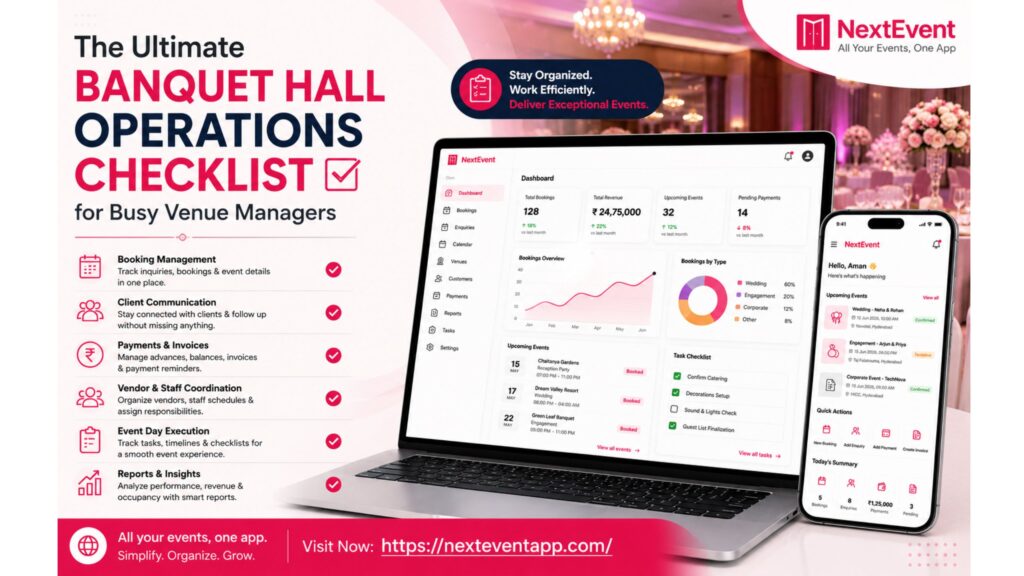
A structured operations checklist helps venue managers stay organized, reduce errors, and deliver exceptional service. Combined with modern banquet hall management software, this checklist becomes even more effective by automating repetitive tasks and providing complete visibility into every event.
Why Every Banquet Hall Needs an Operations Checklist
Running a banquet hall means managing multiple responsibilities simultaneously. Missing just one important task can lead to booking conflicts, delayed payments, poor customer experiences, or operational delays.
An operations checklist helps you:
Standardize daily processes
Reduce manual errors
Improve staff coordination
Deliver consistent customer experiences
Save valuable time
Increase overall operational efficiency
Instead of reacting to problems, you’ll be prepared before they happen.
1. Review the Daily Booking Schedule
Start every day by reviewing your event calendar.
Check:
Today’s events
Upcoming bookings
Venue availability
Event timings
Special customer requests
Setup requirements
A centralized booking calendar ensures every team member knows what needs to be prepared throughout the day.
2. Respond to New Customer Inquiries
Fast responses often determine whether you win or lose a booking.
Review all new inquiries from:
Website forms
Phone calls
WhatsApp
Email
Social media
Provide accurate pricing, venue availability, and package details as quickly as possible.
Using banquet management software allows you to track every inquiry and schedule automatic follow-ups, ensuring no potential customer is forgotten.
3. Confirm Bookings and Documentation
Before every event, verify that all booking details are complete.
Checklist:
Signed agreement
Customer contact information
Event date and time
Guest count
Decoration requirements
Catering preferences
Equipment requests
Keeping everything organized prevents last-minute confusion.
4. Monitor Payments and Outstanding Balances
Financial management is just as important as event planning.
Every day, review:
Advance payments received
Pending invoices
Due payment reminders
Refund requests
Final settlements
Automated payment tracking helps reduce manual calculations and ensures no payment is overlooked.
5. Coordinate Staff Responsibilities
A successful event depends on teamwork.
Assign responsibilities clearly for:
Reception
Event coordinators
Housekeeping
Security
Catering staff
Technical support
Decoration teams
Everyone should know their schedule before guests arrive.
Digital task management makes coordination faster and reduces communication gaps.
6. Inspect Venue Readiness
Conduct a complete venue inspection before every event.
Check:
Lighting
Air conditioning
Sound system
Stage setup
Seating arrangement
Washrooms
Parking area
Cleanliness
Emergency exits
A final inspection helps identify issues before guests arrive.
7. Verify Vendor Coordination
Many events involve multiple external vendors.
Confirm with:
Caterers
Decorators
Photographers
DJs
Florists
Entertainment providers
Ensure everyone understands arrival times and setup requirements to avoid unnecessary delays.
8. Manage Inventory Efficiently
Daily inventory checks prevent shortages during events.
Monitor items such as:
Tables
Chairs
Linens
Audio equipment
Projectors
Decorations
Cleaning supplies
Maintaining inventory records helps reduce replacement costs and improves planning.
9. Track Event Progress in Real Time
During the event, continuously monitor operations.
Observe:
Guest arrivals
Staff performance
Catering service
Event timeline
Customer requests
Technical issues
Quick action during the event helps resolve problems before they affect the guest experience.
10. Collect Customer Feedback
Once the event concludes, don’t end the relationship.
Ask customers about:
Venue cleanliness
Staff professionalism
Food quality
Overall experience
Suggestions for improvement
Positive reviews strengthen your reputation, while constructive feedback helps improve future services.
11. Review Daily Business Reports
At the end of each day, evaluate business performance.
Important reports include:
Total inquiries
Confirmed bookings
Revenue collected
Pending payments
Event completion status
Customer feedback
Upcoming bookings
Regular reporting helps identify trends and supports better business decisions.
How Banquet Management Software Simplifies Daily Operations
While an operations checklist improves organization, banquet management software makes it easier to follow consistently.
A modern solution can help you:
Manage bookings from one dashboard
Track inquiries automatically
Prevent double bookings
Generate invoices
Monitor payments
Manage customer records
Schedule staff tasks
Generate business reports
Access information from anywhere through the cloud
Instead of spending hours on administrative work, venue managers can focus on delivering exceptional events and growing their business.
Best Practices for Efficient Banquet Hall Management
To maintain smooth operations throughout the year:
Standardize your daily workflow.
Train staff regularly.
Digitize records instead of using paper files.
Monitor key performance metrics.
Respond quickly to customer inquiries.
Review reports every week.
Use automation wherever possible.
Small improvements in daily operations often lead to significant long-term business growth.
Conclusion
Managing a banquet hall requires careful planning, strong coordination, and attention to detail. A well-structured operations checklist ensures that every booking, payment, customer interaction, and event is handled professionally.
As customer expectations continue to grow, relying solely on manual processes can slow your business down. By combining a clear operational checklist with smart banquet hall management software, venue managers can save time, reduce errors, improve customer satisfaction, and increase overall efficiency.
Consistent operations create memorable events—and memorable events build successful banquet businesses.
Frequently Asked Questions
1. What is a banquet hall operations checklist?
A banquet hall operations checklist is a step-by-step guide that helps venue managers organize bookings, staff, payments, customer communication, inventory, and event preparation to ensure smooth daily operations.
2. Why is an operations checklist important for banquet halls?
It helps reduce mistakes, improve team coordination, standardize workflows, and deliver a consistent customer experience for every event.
3. How does banquet management software improve operations?
It automates bookings, payment tracking, customer management, reporting, and scheduling, allowing venue managers to save time and reduce manual work.
4. What daily tasks should a venue manager prioritize?
Venue managers should review bookings, respond to inquiries, verify payments, coordinate staff, inspect the venue, monitor inventory, and review daily business reports.
5. Can small banquet halls benefit from digital management software?
Yes. Even small venues can improve efficiency, reduce administrative work, prevent booking errors, and provide better customer service by using banquet management software.