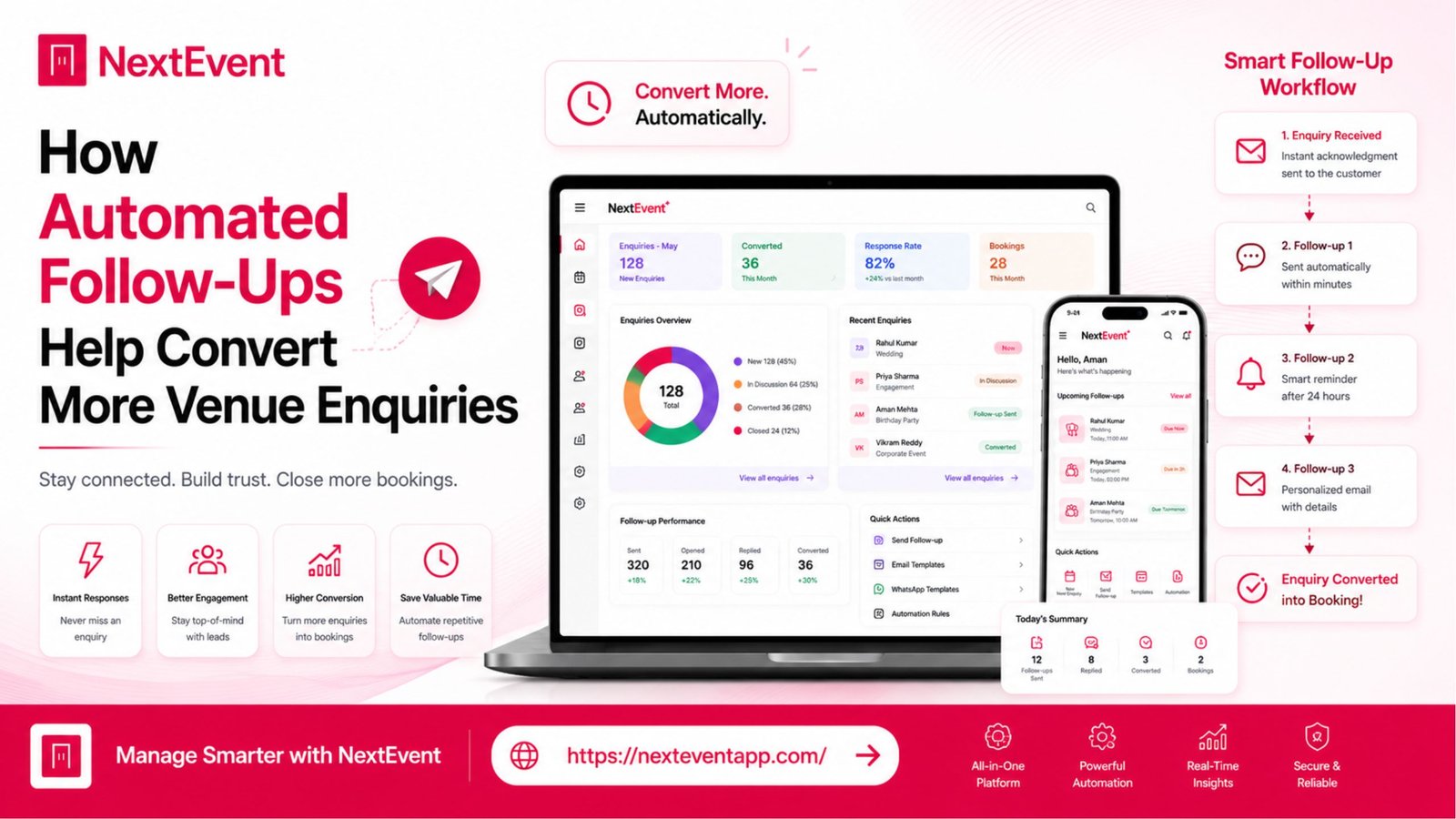
How Automated Follow-Ups Help Convert More Venue Enquiries
Manage your venue with less work.
For banquet halls, convention centers, wedding lawns, gardens, resorts and function halls.
Every successful booking starts with a customer enquiry. Whether someone is planning a wedding, corporate event, birthday party, or conference, their first interaction with your venue often determines whether they become a paying customer. However, many venue businesses lose potential bookings because enquiries are not followed up consistently or on time. Read more here about –Why Unlimited Staff and Device Access Can Improve Venue Operations.
This is where automated follow-ups can make a real difference. Modern Venue Management Software can help businesses organize communication, send timely reminders, and ensure no enquiry is overlooked. Instead of relying on manual calls, emails, or spreadsheets, automation supports a more structured and efficient workflow.
Comparison Table
Manual Follow-Ups | Automated Follow-Ups |
Time-consuming | Saves time |
Risk of missed enquiries | Consistent follow-up process |
Manual reminders | Scheduled reminders |
Difficult to track | Organized communication history |
Depends on staff availability | Works according to configured workflows |
Limited scalability | Better suited for growing businesses |
Why Follow-Ups Matter
Every Enquiry Has Potential
A customer who contacts your venue has already shown interest in your services. Timely communication helps maintain that interest and provides an opportunity to answer questions or share additional information.
Common Reasons Enquiries Are Lost
Delayed responses
Customers may contact another venue if they don’t receive a timely reply.
Forgotten follow-ups
Busy teams can unintentionally overlook pending enquiries.
Inconsistent communication
Different team members may provide different updates without a centralized system.
Business Impact
Consistent follow-ups can improve organization and create a better customer experience.
Best Practice
Respond promptly and maintain a clear communication history for every enquiry.
How Automated Follow-Ups Work
Reducing Manual Tasks
Automation helps businesses schedule reminders and customer communication based on predefined workflows.
Typical Automated Actions
Enquiry acknowledgement
Send a confirmation that the enquiry has been received.
Follow-up reminders
Notify staff when it’s time to contact a customer.
Appointment reminders
Help customers remember venue visits or meetings.
Payment reminders
Support timely communication regarding pending payments.
Operational Benefit
Automation reduces repetitive work while helping staff focus on customer service.
Quick Tip
Review your follow-up workflow regularly to ensure it matches your sales process.
Benefits of Automated Follow-Ups
Better Customer Experience
Customers appreciate timely and professional communication.
Key Advantages
Faster responses
Customers receive updates without unnecessary delays.
Organized communication
Every interaction is stored in one location.
Improved team coordination
Staff members can easily view enquiry status.
Business Value
A structured follow-up process supports consistency across the organization.
Recommendation
Choose software that provides clear tracking for every enquiry.
Real-Time Tracking
Stay Updated
Modern Venue Management Software often includes enquiry dashboards that allow authorized users to monitor communication and follow-up activities.
Useful Information
Pending enquiries
Follow-up status
Customer notes
Booking progress
Business Benefit
Centralized tracking helps reduce confusion and improve collaboration.
Best Practice
Assign ownership of enquiries so team members know who is responsible for the next action.
Scalability for Growing Businesses
Manage More Enquiries Efficiently
As venue businesses grow, the number of customer enquiries also increases.
Automation Supports Growth
Multiple team members
Higher enquiry volume
Standardized communication
Improved organization
Long-Term Benefit
Automation can help businesses manage increasing workloads more efficiently.
Planning Tip
Select software that can support your expected growth over time.
Pros and Considerations
Advantages
Time Savings
Reduced manual work
Better enquiry organization
Improved communication consistency
Additional benefits include:
Faster response management
Centralized enquiry history
Better collaboration
Improved customer experience
Easier workflow management
Considerations
Automated messages should be reviewed regularly to ensure they remain accurate.
Personal communication may still be appropriate for complex customer requests.
Available automation features differ between software providers.
Who Can Benefit?
Businesses that often manage a high volume of enquiries may benefit from organized follow-up workflows, including:
Banquet halls
Wedding venues
Hotels
Resorts
Event planners
Convention centers
Community halls
Multi-location venue businesses
Conclusion
Following up consistently with potential customers is an important part of venue management. Automated follow-ups can help businesses organize communication, reduce repetitive manual tasks, and ensure enquiries receive timely attention.
When evaluating Venue Management Software, consider how the platform supports enquiry tracking, reminders, communication history, and workflow automation. A well-designed follow-up process can improve operational efficiency while providing customers with a more organized and responsive experience.
Frequently Asked Questions
1. What are automated follow-ups in Venue Management Software?
Automated follow-ups are scheduled reminders or communications that help businesses manage customer enquiries and maintain consistent contact.
2. How do automated follow-ups save time?
They reduce repetitive manual tasks by organizing reminders and communication according to predefined workflows.
3. Can automated follow-ups improve customer experience?
Yes. Timely and consistent communication can help customers stay informed throughout the booking process.
4. Should businesses still contact customers personally?
Yes. Automation works well for routine communication, while personal interaction remains valuable for complex discussions and relationship building.
5. What should I look for in automated follow-up features?
Look for enquiry tracking, reminder scheduling, communication history, role-based access, and reporting capabilities that fit your business workflow.